

 (bottom of page)





EDIT (3/2/07)
As you may have seen from my recent post, I am not currently able to have files uploaded.
You can still post links to files on your own webspace.
END OF EDIT
Recommended file type: mp3.
There is a 2 MB limit, I would suggest encoding at 128 kbps if you have an option in your mp3 conversion software.
Please start a new topic for each sound clip (unless you are attaching a few related clips all at once)
Any technical queries please ask in this thread.
CONVERTING TO MP3:
Most recording software records to wav or aiff format which is too large for attachments. To convert a wav or aiff in iTunes on a Mac you need to import your file to iTunes, select it, then in the "Advanced" menu you should see "convert selection to mp3". The mp3 will end up in your itunes music folder, probably in a folder called "unknown artist" if you didn't give it a name in the iTunes playlist.
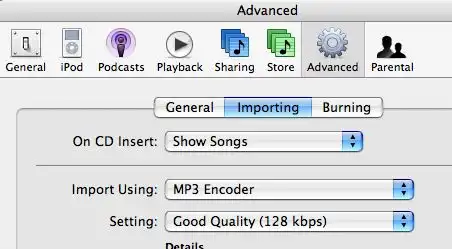
First you may need to set itunes to convert to mp3:
EDIT: The process is the same on PC (thanks rs2sensen) you just need to download iTunes for Windows.
As you may have seen from my recent post, I am not currently able to have files uploaded.
You can still post links to files on your own webspace.
END OF EDIT
Recommended file type: mp3.
There is a 2 MB limit, I would suggest encoding at 128 kbps if you have an option in your mp3 conversion software.
Please start a new topic for each sound clip (unless you are attaching a few related clips all at once)
Any technical queries please ask in this thread.
CONVERTING TO MP3:
Most recording software records to wav or aiff format which is too large for attachments. To convert a wav or aiff in iTunes on a Mac you need to import your file to iTunes, select it, then in the "Advanced" menu you should see "convert selection to mp3". The mp3 will end up in your itunes music folder, probably in a folder called "unknown artist" if you didn't give it a name in the iTunes playlist.
First you may need to set itunes to convert to mp3:
- Preferences (In iTunes Menu at top left)
- Click on Advanced
- Click on Importing
- Set mp3 encoding to 128 kbps
EDIT: The process is the same on PC (thanks rs2sensen) you just need to download iTunes for Windows.


