Miscellaneous Doxy print problem

gladsaxisme

Try Hard Die Hard
Messages
3,086
Location
manchester
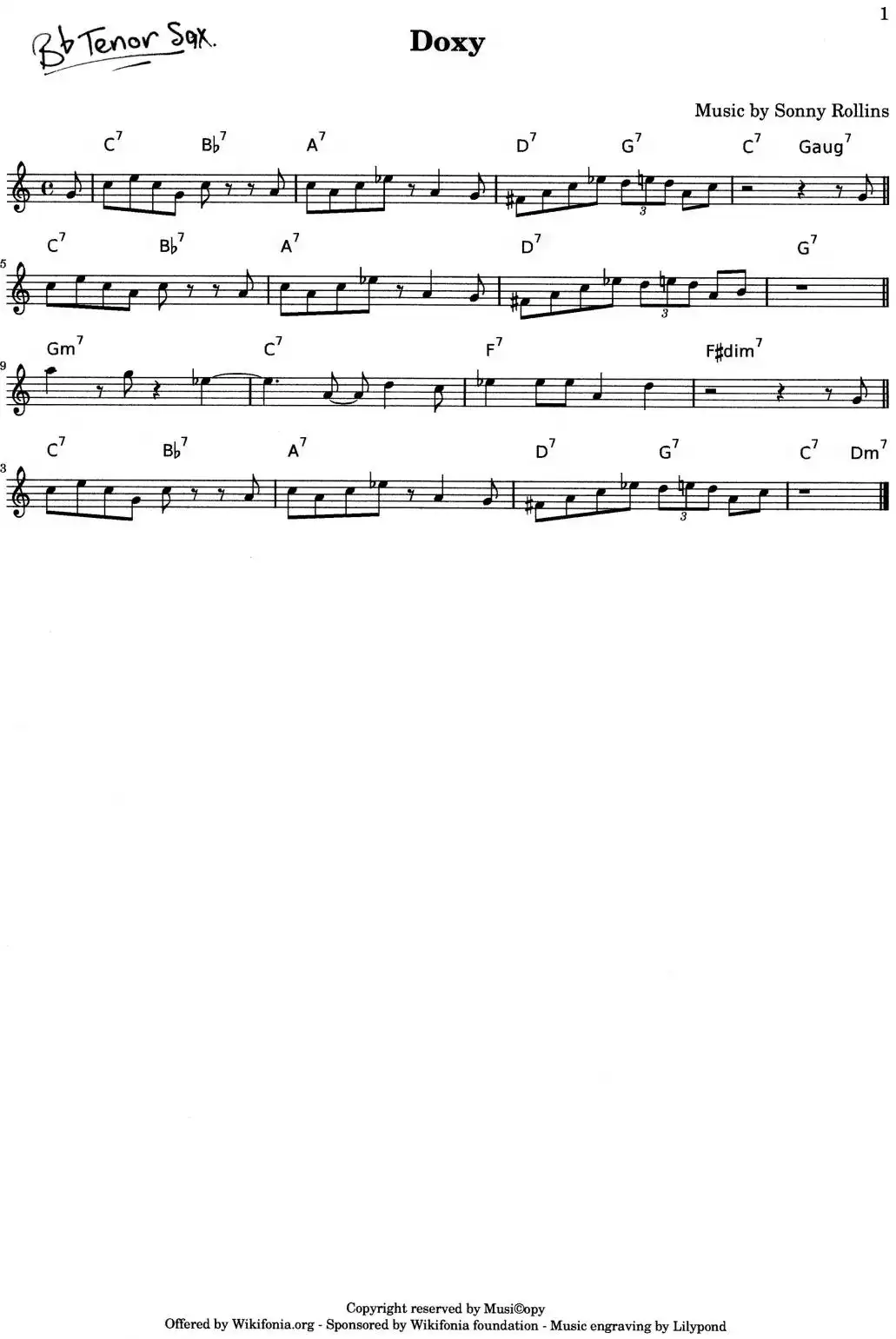
I have decided to give the Doxy impro a try but immediately hit the first hurdle in trying to print off the melody dots provided so generously by Saxman,I don't know what has gone wrong having done this for many of the previous BOTM music and not encountered any problems, but on this occasion I am finding it impossible to print off a full size copy and only manage a two thirds size with a large black border, any one got any ideas what could be going wrong....thanks ....John
 
Last edited by a moderator:
I have decided to give the Doxy impro a try but immediately hit the first hurdle in trying to print off the melody dots provided so generously by Saxman,I don't know what has gone wrong having done this for many of previous BOTM music and not encountered any problems, but on this occasion I am finding it impossible to print off a full size copy and only manage a two thirds size with a large black border, any one got any ideas what could be going ....thanks ....John
hmm, i am not sure there John, maybe something to do with your print settings, i have no problem when printing it, and nobody else as far as i know.
i will look around for another link and if i find one i will post it here.
 
Doxy bflat tenor.jpg
Doxy eflat alto.jpg


You might be able to print from here? Worth a try 🙂
 
View attachment 2854

You might be able to print from here? Worth a try 🙂

Thanks for the speedy replies Sue and Saxman I will give it a try when I get back on the pc, on the iPad at the mo sometimes I'm sure I've got my own personal gremlin living in my PC, I tried to use it first thing yesterday when I was in a hurry and it just refused point blank to do anything ie took for ever to boot restarted about 4times then when it got going refused to open my browser about 6 times
Then when I eventually managed to access a web page and I tried to scroll down using the slide bar because it wouldn't scroll on the roll wheel lost the cursor altogether it just vanished what on earth is that all about ......John
 
Nope that didn't work either it just went on a quest to use up all my black ink in one print off with various other cafe sax stuff thrown in for good measure,let it run three pages before cancelling....john

ps should have run a print preveiw first it showed about six pages of black
 
Last edited by a moderator:
Nope that didn't work either it just went on a quest to use up all my black ink in one print off with various other cafe sax stuff thrown in for good measure,let it run three pages before cancelling....john

ps should have run a print preveiw first it showed about six pages of black
sounds like a printer problem, i had that happen to me before.
 
I'd try upgrading your print driver first but failing that, see if you can find an option under your printer properties that allows you to print as image. Not allways available but worth a look.
 
when I click on the music in drop box it seems to open on a music play window with no print options and when I download the whole thing it comes up imported as zip and I think this is part of the problem, just had a go with my strong glasses on and am finding it very hard to get the rythm so its not looking good already....john
 
.zip means it's a compressed file which needs to be opened\uncompressed before you can use it. You can download free software called 7Zip to do this: http://www.7-zip.org/download.html, then you can upload the file to Dropbox again.

Thanks for the info I'm just wondering if those who have printed off the dots have had to use something like this to do it or if my PC is set wrong in the way it is importing the download I'm sure that written files usually show as something else and not zip files but not very good with computers I think Chris has put some things in drop box so I will try and see what happened with them ......John
 
People usually only turn files into .zip if the file they want to send or upload is very big and they want to make it smaller. It makes little to no sense using this format for a few pages of sheet music. I forgot, if you only want to open a WinZip file, most modern versions of Windows will do this without the addition of any new software. Double click on the .zip file and extract it to a location you are happy you can navigate to, go there and double click on the file.
 

Similar threads... or are they? Maybe not but they could be worth reading anyway 😀

Social

New! Social Feeds

Look out for the navigation icon:

Follow CafeSaxophone

Latest Song of the Month

Trending

Forum statistics

Topics
32,082
Messages
578,843
Members
8,140
Latest member
AnnaR
Back
Top Bottom